
Booking systems
Stop taking bookings by phone, email and spreadsheet
Double bookings, no-shows and hours spent confirming appointments by hand. We build online booking systems for businesses and organisations in Ireland, inside your existing WordPress website, using Gravity Forms or LatePoint. Customers book in a few taps and your team sees every booking in one place.
- Who it’s for
- Clinics, services, tourism and hire businesses
- What you get
- Bookings inside your own website
- Built with
- WordPress, Gravity Forms or LatePoint
- Start with
- A scoping call
The problem
Where manual bookings cost you time
Every booking that arrives by phone or email needs someone to check availability, reply, add it to a calendar and send a reminder. Miss one step and you get a double booking or an empty slot.
Standalone booking platforms can help, but they often sit outside your website and hold your customer data on their side. A booking system built into your own site keeps the journey on your brand, the data in your hands and the rules exactly as you run them.
What we build
Booking features we build
Pick the features your bookings need. Part of our websites, eCommerce and systems work.
Availability and day controls
Set slots, capacity, opening days and blackout dates, and change them yourself without calling a developer.
Automatic SMS confirmations, plus SMS verification so each booking comes from a real phone number.
Reminders and follow-up surveys
Reminder messages before the appointment and a short survey afterwards, sent automatically.
Bookings appear in the right Outlook calendar, so staff work from the Microsoft 365 calendar they already use.
Staff dashboards
One view of upcoming bookings, check-ins and cancellations, with access set by role.
Payments and deposits
Take payment or a deposit at the point of booking where it suits your business, or leave payment for the day.
Date-range bookings for hire businesses, with availability limits and pick-up and return details captured up front.
Accessible, mobile-first forms
Booking forms built to WCAG for keyboard and screen reader users, and tested on phones, where many bookings start.
How it works
How a booking project works
Step 1
Map your booking rules
We document services, staff, slots, opening days, verification, payments and what should happen before and after each booking.
Step 2
Choose and design
We recommend LatePoint or Gravity Forms, design the booking journey for mobile first, and agree every message customers receive.
Step 3
Build and test
We build inside your site, connect SMS, calendar and payments, and test real bookings end to end with your team.
Step 4
Launch and train
Go-live, staff training on the dashboard, and a check after the first weeks to adjust rules and messages.
Proof
Booking systems in use
Two booking systems in daily use: one for a community health service, one for a tourism business. Both run inside the client’s own website.
Community health
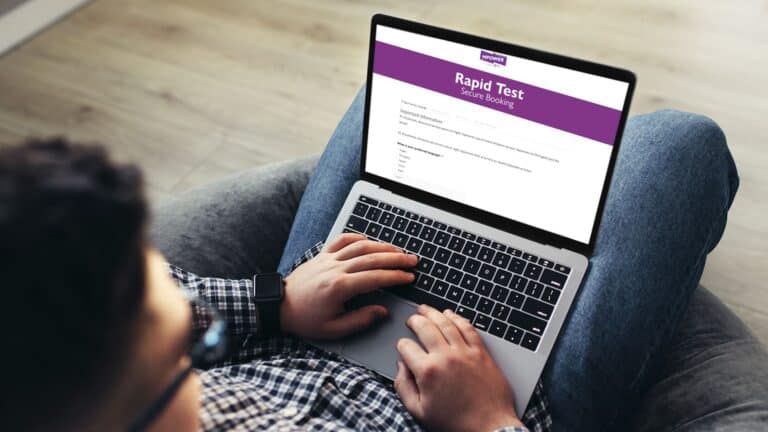
Rapid-testing appointments booked inside MPOWER’s existing website, with slot availability, day-of-week controls, SMS confirmation, SMS verification and a follow-up SMS survey. The result: less manual admin and more control of testing availability.
Tourism

A Gravity Forms booking system for a bike hire business in Westport, Co. Mayo, alongside Google Business Profile work, mobile-first pages and geo-targeted Google Ads.
Ways to start
Three ways to start
Every booking project is fixed scope, so you get a written price and timeline before we start. If you already have a booking form, start by checking it works for everyone. Fixed scope, ask for a quote.
Walk us through how you take bookings today and get a written, fixed-scope quote for the build.
Not sure which booking setup fits? Book a free 30-minute call with Philip and we will point you to the right starting place.
Monthly updates, backups, security and uptime monitoring for your site and booking system, with time for small changes.
Keep exploring
Related pages
Common questions
Can you add online booking to our existing website?
Yes, if it runs on WordPress. MPOWER’s booking system was built inside its existing website. If your site is on another platform, we will talk through the options, including a WordPress rebuild where that makes sense.
Gravity Forms or LatePoint: which is right for us?
LatePoint suits appointment-style bookings, with services, staff, time slots and a staff dashboard ready to go. Gravity Forms suits bookings with custom rules, such as verification steps, eligibility questions, multi-day hire or approval before confirmation. Where neither can do something alone, Make.com connects it to SMS, Microsoft 365, HubSpot or a Google Sheet.
Does it work with Outlook?
Yes. Bookings can sync to Microsoft 365 and Outlook calendars, so staff see appointments in the calendar they already use. We set up the sync during the build and test it with your team before launch.
Does the European Accessibility Act apply to our booking system?
It may. The Act has applied in Ireland since 28 June 2025 (S.I. No. 636 of 2023) and covers a range of consumer-facing digital services, depending on your sector and size. We build booking forms to WCAG and provide training and technical support, not legal advice, so check with your solicitor or adviser whether it applies to you.
Who looks after it after launch?
Your team runs day-to-day bookings from the dashboard. We can look after updates, backups and changes on our Website & Systems Care Plan.
How much does a booking system cost?
It depends on the rules, integrations and payments involved. Every project is fixed scope, so ask for a quote and you will get a written price before we start.
Tell us how you take bookings today
Book a call with Philip Weldon, Managing Director. Walk us through your current process and we will tell you whether LatePoint, Gravity Forms or something simpler is the right fit.